
Baji999 Pakistan Mobile App
Native Android and iOS apps 📱 for casino games, sports betting, account management. Download APK directly for Android, install via profile for iOS. Full game library, live betting, instant deposits through EasyPaisa and JazzCash. Works on Jazz, Zong, Ufone, Telenor 3G/4G networks.
Download App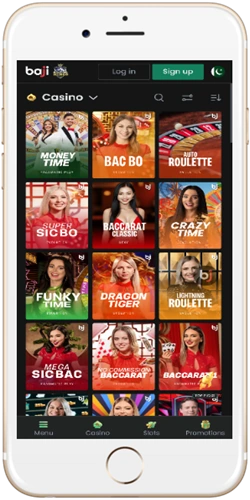
Android app installation
Android app comes as APK file downloaded directly from website. Not available on Google Play Store due to real money gambling restrictions. File size approximately 45MB, requires Android 5.0 or higher. Installation takes 2-3 minutes with simple permission settings.
Enable unknown sources
Go to Settings → Security → Unknown Sources, toggle on. This allows APK installation from outside Play Store. Required only once—setting stays enabled for future updates. Some newer Android versions ask permission per app during installation instead of global setting.
Download APK file
Visit website on phone browser, click Download Android App button. File saves to Downloads folder, typically takes 30-60 seconds on 4G. Chrome may show warning about APK files—click OK to proceed. Verify file size is around 45MB to ensure complete download.
Install application
Open Downloads folder, tap APK file. Android shows installation screen listing permissions—internet access, storage access. Tap Install, wait 20-30 seconds for process to complete. App icon appears on home screen after successful installation.
Launch and login
Open app from home screen, login with existing credentials or register new account. First launch downloads additional game assets, approximately 15-20MB. Subsequent opens are instant. Enable notifications in app settings to receive bet confirmations and promotion alerts.
Updates release every 2-3 weeks with bug fixes and new games. App notifies when update available. Download new APK, install over existing app—preserves login and settings. No need to uninstall old version first. Updating takes 1-2 minutes total.
Get Android APKiOS app installation
iOS installation uses configuration profile method since app isn't on App Store. Requires iOS 11.0 or higher, works on iPhone 6S and newer models. Installation process slightly longer than Android but equally straightforward. No jailbreak needed.
Download profile
Visit website in Safari browser—must use Safari, not Chrome or other browsers. Tap Download iOS App. System shows profile download confirmation, tap Allow. Profile installs certificate enabling app installation outside App Store.
Install profile in settings
Go to Settings → General → VPN & Device Management. See downloaded profile listed, tap it, tap Install. Enter device passcode if prompted. Read profile description, tap Install twice more to confirm. Profile installation completes in 10 seconds.
Download app
Return to website in Safari, tap Install App button that now appears. App downloads and icon appears on home screen with "Installing..." progress bar beneath. Wait 2-3 minutes for installation to complete. Don't tap icon until progress bar disappears.
Trust developer
First time opening app, iOS shows "Untrusted Enterprise Developer" message. Go to Settings → General → VPN & Device Management → Enterprise App, tap developer name, tap Trust. Return to home screen, open app normally. Only needed once.
iOS updates require re-downloading profile and app when new version releases. Process same as initial installation. Update notification appears in app when available. Existing account data and preferences preserved through updates.
Get iOS AppApp features and functionality
Mobile app mirrors website functionality with interface optimized for touchscreens. All casino games, sports betting markets, payment methods available. Biometric login on supported devices—fingerprint or face recognition. Push notifications for bet settlements, bonuses, important account updates.
Casino games library
500+ slots including Book of Dead, Starburst, Gates of Olympus. Live casino with real dealers—roulette, blackjack, baccarat. Aviator and Plinko crash games. Games load within 2-3 seconds on 4G. Portrait and landscape modes supported for optimal viewing.
Sports betting interface
Browse all sports with streamlined navigation. Live betting with real-time odds updates. Bet slip sticks to bottom screen for quick access. Live scores and match statistics. One-tap bet placement. Filter by league, country, odds range.
Instant deposits and withdrawals
Deposit via EasyPaisa, JazzCash, bank transfer, cryptocurrency directly in app. Scan QR codes for crypto payments. Transaction history with download option. Withdrawal requests processed same as website—24-72 hours depending on method. Verification documents upload through app camera.
Account management
View balance, bonus status, wagering progress. Transaction history with filters by date and type. Change password, update personal details. Set deposit limits and cooling-off periods. Access customer support chat. Notification preferences control.
App runs smoothly on mid-range devices from 2019 onwards. Minimum 2GB RAM recommended for optimal performance. Battery usage comparable to other gaming apps—roughly 15-20% per hour active gameplay. Works on mobile data and WiFi, switches seamlessly between networks.
Explore FeaturesPerformance and compatibility
App tested extensively on popular Pakistani phone models. Samsung Galaxy A series, Xiaomi Redmi, Oppo A series, Vivo Y series all run smoothly. Works reliably on Jazz and Zong 4G networks with typical speeds 5-10 Mbps. Playable on 3G but game loading slower.
Android requirements
Android 5.0 Lollipop minimum, Android 8.0 Oreo or higher recommended. 2GB RAM minimum, 3GB+ RAM for best experience. 150MB free storage for app and cache. Screen resolution 720p minimum, 1080p for crisp graphics. Works on phones and tablets.
iOS requirements
iOS 11.0 minimum, iOS 13.0+ recommended. Compatible with iPhone 6S and newer. iPad Air 2 and newer tablets supported. 200MB free storage. Runs natively on M1/M2 chip Macs but designed for mobile use. Not optimized for macOS interface.
Network performance
4G networks provide optimal experience—games load in 2-3 seconds, live betting odds update smoothly. 3G usable but expect 5-8 second load times. WiFi connection ideal for large game downloads and high-stakes live betting where instant odds updates critical. Minimum 2 Mbps connection speed recommended.
Data usage approximately 50-80MB per hour for slots gameplay, 100-150MB per hour for live casino with video streams. Sports betting uses 20-30MB per hour. Enable data saver mode in app settings to reduce usage 30-40% by lowering graphics quality and limiting automatic updates.
Test PerformanceCommon installation issues
Most installation problems stem from permission settings or incomplete downloads. Solutions typically take under 5 minutes. Contact support if issues persist after trying these fixes.
Android installation blocked
If "Installation blocked" message appears, Unknown Sources setting not enabled properly. Go to Settings → Apps → Special Access → Install Unknown Apps, find your browser (Chrome or Firefox), enable permission. Retry APK installation. Some phones require enabling per-app instead of global security setting.
iOS app won't open
"Untrusted Developer" error means profile trust step incomplete. Settings → General → VPN & Device Management, tap developer profile, tap Trust. If profile missing, reinstall from website. Occasionally need to delete app, reinstall profile fresh, then reinstall app.
App crashes on startup
Usually indicates incomplete download or corrupted file. Delete app, clear browser cache, redownload APK or profile. Ensure stable internet connection during download. Android users can verify APK file size matches website listing. iOS users should complete entire download in single session without interruption.
Games not loading
Check internet connection first. Clear app cache in phone settings. Android: Settings → Apps → Baji999 → Storage → Clear Cache. iOS: Delete and reinstall app (preserves login credentials if using cloud backup). Ensure sufficient free storage—minimum 500MB recommended for smooth operation.
For persistent technical issues, contact support via live chat or email info@baji999pk.com with device model, operating system version, exact error message. Support team typically responds within 2-4 hours, provides device-specific troubleshooting steps.
Get SupportApp versus mobile website
Both app and mobile website offer full functionality. App advantages include faster loading, offline account viewing, push notifications, biometric login. Website advantage is no installation needed—instant access from any browser. Choose based on personal preference.
App loads games 30-40% faster than mobile site due to local caching. First-time game loads similar speed, but replaying same game significantly faster in app. Push notifications keep you informed of bet outcomes and bonuses without manually checking account. Biometric login saves time versus typing password.
Mobile website best for trying platform before committing to download. Also useful on devices where app installation restricted—work phones, borrowed devices. Website works identically on computer browsers for those preferring larger screens. Account data syncs across all platforms—play on app, switch to computer, continue seamlessly.
Updates automatic for website—always latest version. App requires manual update downloads every few weeks. However, app continues working on old version until critical update needed. No forced updates that interrupt gameplay.
Try Mobile Site